$ curl -fsSL https://download.jtlgrowth.com/products/install.sh | bash
Product key (JTL-XXXXX-XXXXX-XXXXX-XXXXX): JTL-7KQ2M-X9DFA-P4TZW-R8NCH
✓ Key accepted. It includes: qa-security
✓ installed ~/.claude/skills/qa-security
wired claude: ~/.claude/CLAUDE.md
✓ installed ~/.codex/skills/qa-security
wired codex: ~/.codex/AGENTS.md
✓ Installed: qa-security
QA + Security employee
Hire Seb once. It checks your app, your upload forms and your pushes before customers see them.
Seb lives in Claude Code or Codex on your computer. It tests your app like a real customer, tries the harmful files attackers send on your own upload forms, and once you switch on its push check, blocks a push that carries a leaked key or another serious problem.
USD 2,997 one payment, yours to keep. In the Philippines: PHP 190,500. With the first audit by JTL: USD 4,997 (PHP 317,500).
What Seb does
One leaked key or one open upload form can cost more than the whole app. Seb looks for both.
- It checks your whole app in one pass. Leaked keys, open database tables, data-changing pages with no login check, and unsafe code. Each finding with the file, the line and the fix in plain words.
- It tests your upload forms. A picture with a hidden script inside, a harmful program renamed to look like a photo, a file far too big. If your form accepts one, you see it before a stranger does.
- It checks your live site. That it forces https, sends the standard browser protection headers, does not expose secret files and does not load insecure files.
- Tess clicks through it like a customer. Phone and laptop size, wrong inputs, empty pages, sign out and back in, in a real browser. No browser tool connected? Seb walks you through a short manual test instead.
- It fixes what it finds, with your OK. Then it runs the same check again to prove the fix.
- It can keep checking on its own. Switch on the push check and every push is scanned: a leaked key, a serious problem or an upload form not tested in the last 30 days stops the push until it is fixed. You can skip it on purpose, and Seb tells you how.
- Or let us run the first audit. With the first audit option, we check your live app ourselves, send a written report and check again after your fixes.
What you need
What Seb needs to work, and who brings it.
You bring
- A Mac or a Windows computer. Seb lives on it.
- Claude Code or Codex on your own plan. Claude plans start at about USD 20 a month.
- Your app's code in a git folder. An app you own or are allowed to test.
Installed for you
- Claude Code and Node. Added if they are missing.
- git. For the push check. Added if it is missing.
Only when a job needs it
- The browser tool for Tess. One command Seb gives you, free. Without it, Seb guides a short manual test.
- The push check. Off until you say yes, one command per project.
How buying works
Pay once, get a product key, install with one line.
Pay
GoTyme QR from any Philippine bank or e-wallet, or Wise from anywhere else.
Send your order
How you paid, a screenshot of the payment, your name and email.
Get your key
We confirm the payment and email your product key, within one business day.
Install
Mac: curl -fsSL https://download.jtlgrowth.com/products/install.sh | bash
Windows: irm https://download.jtlgrowth.com/products/install.ps1 | iex
Install call
Want us with you? Reply to your key email with two times that work for you. We send a Google Meet or Zoom link, you share your screen, and we watch each step with you. It comes with your key.
Pay
Two ways to pay, both one time.
In the Philippines: GoTyme QR
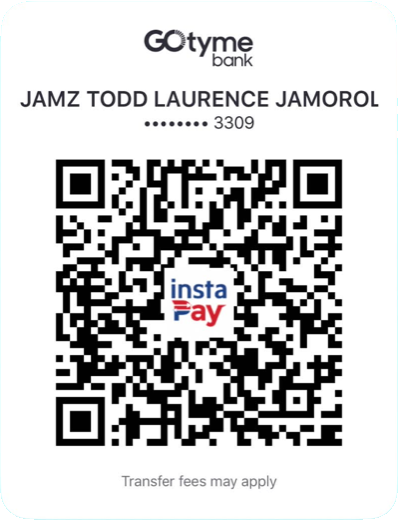
- Scan with GCash, Maya or any bank app (InstaPay).
- Amount: PHP 190,500, or PHP 317,500 with the first audit.
- Take a screenshot of the receipt for your order.
Anywhere else: Wise
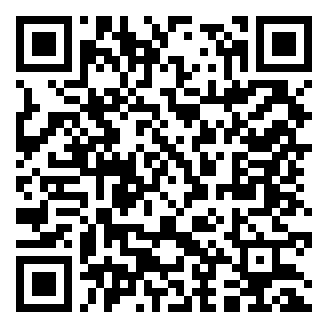
- Pay USD 2,997, or USD 4,997 with the first audit by card or bank transfer, in your own currency.
- Take a screenshot of the Wise receipt for your order.
Send your order
Where should your key go?
Questions
Before you buy
What do I need?
See What you need above: what you bring, what the installer sets up for you, and what only some jobs need.
What computer do I need?
It works on a Mac with macOS 13 or newer, or on Windows 10 (version 1809 or newer) or 11, with 8 GB of memory (RAM) and 30 GB free. We recommend an Apple Silicon Mac (M1 or newer) or a Windows 11 laptop with 16 GB of memory and 512 GB of storage. For long or 4K videos: 24 to 32 GB of memory and 1 TB. The first install downloads about 3 GB and takes 15 to 40 minutes. The full table and every install screen: shop.jtlgrowth.com/guide
Is this a subscription?
No. One payment. Updates come through the same key: run the install line again.
Is this a penetration test?
No, and we never call it one. Seb checks your own apps. If a compliance audit asks for a certified penetration test, hire a licensed firm; Seb makes that test shorter because the easy holes are already closed.
What does the first audit include?
We run Seb and our own checks on your live app, send a written report with every finding and its fix, and check again after you fix them. We set the date with you once your order is accepted.
Which apps can it check?
Websites and web apps you own or are allowed to test. The live-site check works on any site. The code scan is strongest on Next.js, Express, Supabase and Python projects. Seb only tests a site after you confirm you own it.
Who is Tess?
Seb's testing helper, built into Seb: she clicks through your app in a real browser and reports what broke.
How long until I get my key?
We check your payment and email your product key within one business day.
I lost my key.
It is saved on your computer in ~/.jtl/product.key. Not there? Reply to your key email and we send it again.
The whole team